Friday, May 1, 2009

Woo Hoo…Windows 7 Media Center Extender to Xbox 360 plays all types of video types!!!

Finally…Without having to install any extra codec products (like KLite or Shark007 Codec Pack) Windows 7 play all of my home video files taken with the variety of cameras and camcorders we have used over the last 10 years.  What a joy to finally watch all our home movies right on Windows 7 as well as our XBOX 360 without any “conversion” like we had to back in the Vista/XP days. 

I love Windows Media Center.  Great job team.  Gets better every release.

ps… the “play favorites” has become a family favorite feature.

Windows 7 RC and Dell XPS 1330 – smooth sailing

I'm happy to report that the install of Windows 7 RC went very well on my Dell XPS 1330.  I'll write more about iimaget later, but I did not have to install anything specific from the dell website.  I just did a clean Windows 7 RC install, ran windows updates after the install which added fingerprinting, video display, and memory card (SD, etc) support. Other components installed during the initial install (Bluetooth and the embedded Dell Webcam).

Its so much faster than the Beta.

Only issue, Norton 360 3.0 seems to have issues where there were no issues with the Beta.

More later…

ps

MS has gotten really creative with their wall papers and account pictures

Wednesday, April 15, 2009

Codec and “Windows 7” Explorer Crashing

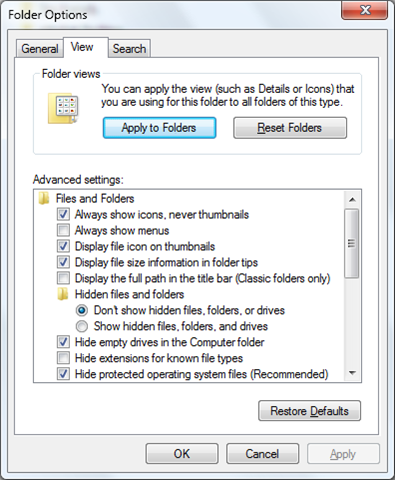
I recently found out that due to corrupt or incompatible codec’s installed on my upgraded Windows 7 (from Vista), Windows Explorer will crash when it tries to produce “Thumbnails” for the icons it is trying to represent.

I had to turn enable “Always show icons, never thumbnails” to get Windows 7 to be stable.  Love the thumbnails feature, but love a stable OS more.  the OS is fun and solid for a beta…too bad something like faulty codec’s can break the explorer.

image

Codec Pack and Windows 7

Before upgrading Windows 7, you should uninstall any Codec Packs that you might have installed.  Microsoft did a lot of work to add great support for common Codecs and having Codec's packs can cause issues with playback or stable support for video.  Research your codec pack before upgrading  (k-lite, shark007 vista, etc).
 
S.

Windows 7 – NVIDIA GeForce 8400M GS Beta Driver


Windows 7 Updated provides a beta driver for my XPS m1330 NVIDIA card:

image

I’ve had a lot of stability issues with this update.  Good thing that “Rollback Driver” still works in Win7 :)  Update at your own risk.

S.

Linksys Powerline AV Adapter

I tried this technology a few years ago and did not have much luck with it.  It was a D-Link Powerline system that converted your standard power outlet into instant network cabling.  It just didn’t work and was unreliable.image

A little while ago, we added a Powerline-based security-IP camera to our network from Logitech.  Its a really cool system and easy to setup.  Web cam plugs in outside directly into an outlet.  Then you plug another box right beside your PC/Server (one side into an outlet directly and the other into a USB port) and blamo, you got a direct network connection from the security camera right to your PC/Server.

I figure i’d try Linksys’ second generation Powerline systems to connect my Windows Home Server 2003 to our network.  It was working over a Wireless N Network well, but was chewing up valuable Wireless bandwidth, plus, the Linksys Wireless N USB Adaptor would give up about once every two weeks under load requiring the server to be reboot (yuck).

I swapped out the Linksys Wireless N USB card on the server with a Powerline AV Adapter Kit HD (PLK300) and its been working great for a few months now.

This diagram shows how it uses your power plugs as a network.