Showing posts with label General. Show all posts

Tuesday, July 14, 2009

Excel Web Services and that Currency, Accounting format (bold) issue

I have been working with the Microsoft QA team on the Excel Services issue i blogged about earlier.  It turns out to fix the problem, install any custom fonts used by our excel spreadsheet that will be consumed through Excel Web Services on the server.  After you install the fonts on the server, an IIS Reset is required for it to take.

After doing so, Bold type fonts will render correctly.

Thanks MS QA for your help on this!

S.

Thursday, July 2, 2009

Windows 7 – Add your own search engines!

Love this feature i stumbled across Sarah Perez’s (Chanel 10 Blogger) site… http://cid-781010de23482939.profile.live.com/

She shows a way to add Windows 7 Search context’s to the Windows Explorer.

I took her example of how to search the Microsoft Support site and updated it with BING (she was using live), then found another one for Twitter and finally created my own for MSDN searches.

You can grab them from my skyDrive here:

http://cid-4320f28e64229e18.skydrive.live.com/embedrow.aspx/Public/Windows7SearchAdd-ins


Just download them, and open them up.  Windows will ask you if its ok to register them and voila!  You get search power right from Windows Explorer:

image

Hide Live Messenger from the Windows 7 Start Menu Taskbar

I just wanted my Messenger to hide the way it did in Windows Vista and XP.

Right now, when you minimize Windows Live Messenger, it takes up a lot of space in your taskbar.

image

So here’s a trick i found out when testing some code for Windows 7…

If you set the properties of an application to run as an older OS, it will allow the app to behave like it did in the “old” days.

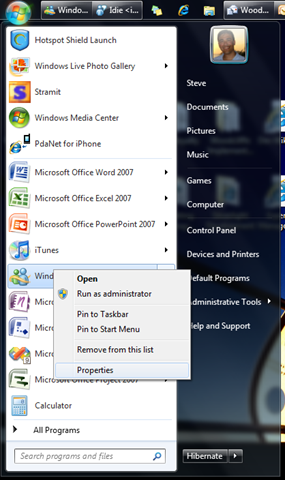
So find your Messenger in your “Start Menu” and right click on it and select “Properties”

image

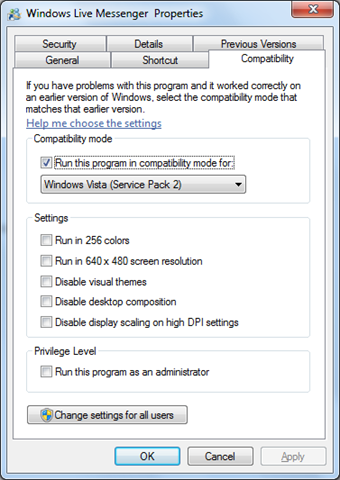
Then from the Compatibility tab, set the mode to “Windows Vista”

image 

Make sure to Restart Messenger and you done.

Now when you close your messenger window, it will run the way it did in the background accessible from your notification area.

image 

The last thing you might want to do is tell Windows 7 to always show the icon so you have it always ready to go…

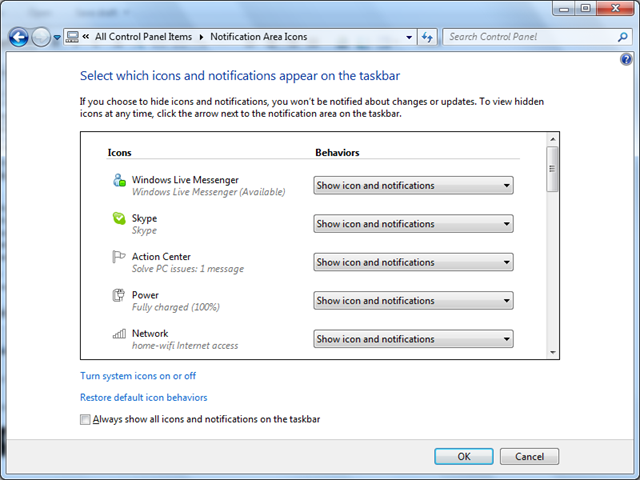
From the Control Panel, click Notification Area Icons and set the Windows Live Messenger to “Show icon and notifications”.

image

Cheers

S.

Wednesday, June 10, 2009

Excel Web Services format issue “Accounting” format vs “Currency”

Strange, but when you publish an Excel sheet to Sharepoint and view it with Excel Web Services, cells formatted as “Accounting” show as follows:

clip_image002

but when you change the format in Excel to “Currency”, it shows correctly:

clip_image004

Could it be some kind of spacing issue with the rendering of the “$” within the web page?

Tuesday, June 9, 2009

Fix - Excel Web Services returning "External References" Error

Today, we got a strange error when trying to open a published Excel 2007 Workbook in on Sharepoint with Excel Web Services.  The Excel web part returned an error saying "External References (links to other workbooks)" we in the file and could not be opened.  The 12 Hive log files had the same error and did not help any further with what the issue could be.

Looking at the file's external links properties in excel showed nothing.

I ended up renaming the xlsx file to a zip, and unzipping the Excel file… scanned the workbook.xml file and found a reference to an “external reference” that did not show up in the Excel interface:

image 

Searching for the unique id in the rest of the zip file, i found it lead to a “Named Range’ that pointed to an external file.

Voila, went back into Excel, removed the Named Range….

image

Republished the Excel file and it worked.

MS should update the sharepoint error message saying a formula, or named range is referencing an external file.  Would have helped.

Cheers

S.

Friday, May 1, 2009

Woo Hoo…Windows 7 Media Center Extender to Xbox 360 plays all types of video types!!!

Finally…Without having to install any extra codec products (like KLite or Shark007 Codec Pack) Windows 7 play all of my home video files taken with the variety of cameras and camcorders we have used over the last 10 years.  What a joy to finally watch all our home movies right on Windows 7 as well as our XBOX 360 without any “conversion” like we had to back in the Vista/XP days. 

I love Windows Media Center.  Great job team.  Gets better every release.

ps… the “play favorites” has become a family favorite feature.

Windows 7 RC and Dell XPS 1330 – smooth sailing

I'm happy to report that the install of Windows 7 RC went very well on my Dell XPS 1330.  I'll write more about iimaget later, but I did not have to install anything specific from the dell website.  I just did a clean Windows 7 RC install, ran windows updates after the install which added fingerprinting, video display, and memory card (SD, etc) support. Other components installed during the initial install (Bluetooth and the embedded Dell Webcam).

Its so much faster than the Beta.

Only issue, Norton 360 3.0 seems to have issues where there were no issues with the Beta.

More later…

ps

MS has gotten really creative with their wall papers and account pictures

Sunday, March 22, 2009

Linksys Powerline AV Adapter

I tried this technology a few years ago and did not have much luck with it.  imageIt was a D-Link Powerline system that converted your standard power outlet into instant network cabling.  It just didn’t work and was unreliable.

A little while ago, we added a Powerline-based security-IP camera to our network from Logitech.  Its a really cool system and easy to setup.  Web cam plugs in outside directly into an outlet.  Then you plug another box right beside your PC/Server (one side into an outlet directly and the other into a USB port) and blamo, you got a direct network connection from the security camera right to your PC/Server.

I figure i’d try Linksys’ second generation Powerline systems to connect my Windows Home Server 2003 to our network.  It was working over a Wireless N Network well, but was chewing up valuable Wireless bandwidth, plus, the Linksys Wireless N USB Adaptor would give up about once every two weeks under load requiring the server to be reboot (yuck).

I swapped out the Linksys Wireless N USB card on the server with a Powerline AV Adapter Kit HD (PLK300) and its been working great for a few months now.

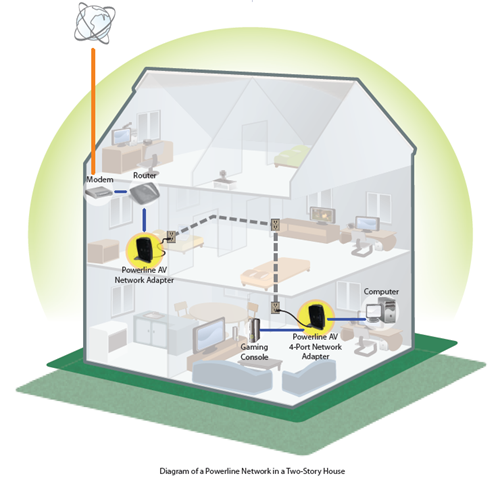
This diagram shows how it uses your power plugs as a network.

Sunday, February 15, 2009

Windows 7 and XBox 360 Media Center Extenter

Tonight, i finally got a chance to try to see what the XBOX 360 Media Center Experience would be like when connected to Windows 7.  I am so happy to finally be able to stream and watch home video's on my xbox extender.  Before, my AVI, MPG,etc files (taken with casio, canon, sanyo, and only cameras) would not play through the xbox extender, using Vista; but Win7 it works!!!.  Our hi-def videos show perfectly.  It also has a great screen saver cycling through our photo library.  perfect for where our xbox extender is; in our dining room.


Thursday, June 12, 2008

Giving the Mac Airbook a run for its money... HP Voodoo Envy

Windows Home Server Power Pack Beta 1


The Home Server team released the new Power Pack and it has some nice improvements.image

First it resolved one of my backup issues with our primary Media Center PC where it was not able to backup the Hot-Swap drive.  Bug fixes are good.

It also now lets you multi-select files and download them from the server as a compressed zip.  Yippie!  It even shows thumbnails for photo's (but not for videos). 

The new Home Connect software that runs on each PC in the home now has a self update feature...self maintaining software is a great Father's day gift...Thanks MS...Less "IT Support Dad", more time for cool technology.

Tuesday, June 10, 2008

Rogers iPhone July 11th? hum...


Hum, you put two and two together and you get?  Apple has announced their 3G iPhone will be available July 11th to Canadian Customers (and worldwide)...

image

http://www.apple.com/ca/iphone/buy/

Then you flip over to the Rogers web site, and they have this big "Teaser" about something "Really Big" coming to Rogers on July 11th.

image

http://www.rogers.com/

ya know...Rogers...the cat is out of the bag...what's the point of hiding the Really Big device?

..and no, i'm not waiting to get one...  :)

Wednesday, February 27, 2008

Worldwide Telescope


It looks like Microsoft has taken their cool PhotoSynth technology and applied it to Space Exploration.  In Q4 of last year, they pushed Photosynth into Virtual Earth letting you pan and zoom photographic data taken by helicopters across the earth.  It now seems like they have done the same but with satellite images and earth images of Space.

Worldwide Telescope is said to be available in the Spring of 2008.  Should be really cool.

If you have not tried Photosynth yet...check this out:  http://labs.live.com/photosynth/ or check it out by downloading the 3D viewer from Virtual Earth (http://local.live.com)

S.

Friday, February 15, 2008

Thoughts on MS Home Server (and the COOL WebGuide4 Add-in)


I recently installed the new Windows Home Server to help manage our computer backups and share video, pictures and movies across our network (diagram pre-Home Server).

Home Server has been a really cool (and inexpensive**) add-on to our home network.  It provides us with:

  1. Daily backups of all home-connected computers
  2. Streams pictures and SOME video nicely to our XBOX 360 - Add WebGuide4 and IT ROCKS!!!
  3. Centralized storage of our data
  4. Remote connection to your PC (as long as its Vista Ultimate or older XP OS')

** HP is one of the first companies to sell Home Server machines to the public.  However, you could take an older PC in your home and install an copy of Home Server with a purchased copy from companies such as this.

Backups

Our daily backups are seamless.  Initially each computer took about 2 hours to do a full backup.  After the initial backup image, they take about 10-15 min each night....and those times are over a Wireless Network...both Server and client.  Yes!  Our Windows Home Server is not even connected via a network wire, but rather a Wireless-N connection.  I was worried about the server running wirelessly initially since its not a supported configuration...but i have had ZERO problems with in and its been running for a 1.5 months now.  I still plan on having someone come in to run a buried wire to my router...but i gotta find the time.

 image

Picture, Video, Music streaming

Out of the box, the experience for this could be MUCH better.  Thankfully, Home Server is a developer-friendly environment and companies like ASCII EXPRESS have filled the void where MS couldn't in time for the release (or lack of will).  Without add-ins you can have up to 10 registered users access your Home-Server and users have this kind of view to shared video, picture and music:

image

After installing the FREE add-in from a ASCII Express ( a guy who has now been hired by the Microsoft Windows Media Center Team), your video, picture and music experience is more like this:

image

It even lets you streaming music and video over the web:

image

And the Photo sharing experience is wonderful.  Thumbnail views, Zooming and panning capabilities, and even picture details.

WebGuide4 just such a slick User experience.  A MUST for any Home Server.

A list of other add-ins for WHS can be found here

Storage

Being able to store data centrally is great.  But what is even cooler is you can grow your storage space as easily as plugging in another USB External Hard Drive!  Here you can see i've added a 500GB USB Drive to my existing 150GB for storage:

image

You can also ask Home Server to "Duplicate" some of your important folders (such as family photo's or video's) so that in case of a major hard drive failure you are protected.

Remote Access to your Computers

Being able to access any of your home computers remotely is really cool...Unfortunately, it only works if you have specific versions of the operating system on your computer for Home Server to connect too.  Most home computers today will come with Windows Vista Home Premium....and Home Server does not consider this an acceptable computer to provide remote access too.  You have to be running Vista Ultimate for Remote to work (or older XP editions which is odd).  I think the Home Server team should talk to the Vista team and unlock this feature for Home Server access.  How many times did i get a call from home asking for remote help?  Now i have to upgrade of our Home PC's to Ultimate just to get this?!  Please fix this MS on your next release!!!

Things that could be better

Clear Direction on the Photo/Video story from Microsoft

The Media Center team needs to talk to the Home Server team (Media Sharing) which needs to talk to the Zune team which needs to talk to the Windows Live Team (Live Photo) which needs to talk to the XBOX 360 Team (MCE and/or Blade Video/Photo's).  What's going on?!  We need a common approach on how to store video and pictures and share them with our friends and devices.  For example, Media Center has this neat way exposing a folder that contains both Video and Pictures.  If you are in "Pictures", you have a cool "Related Video" link that allows you to show video's found in that same folder (ie related to these pictures).  This approach is also how Windows Live Photo deals with the import of pictures and video from a camera that does both (like our Casio EX-880...which by the way does AWESOME HD Video).  This is great!  So your approach would be to move all video and photo's into the same directory...This is where is dies...cause if you do, you can't share it properly with Home Server...since home server requires you to have your video and photo's separate (ala Media Player).  So why does this matter?  Well, if you don't separate them, then you can't access the pics and video from your Home Server to your XBOX 360...or other media extender devices.

Synchronization across computers for family and friends

Microsoft bought a company many moons ago called FolderShare.  MS quickly logo'ed it as a "Live Service" but has done nothing with it since.  An alternative is MS Sync Toy, but is no where near as powerful, flexible, and more importantly, stable.  I'd love to see FolderShare as part of the Home Server service

Centralized Recorded TV

There has been some work around this in the dev community, but no clear winner, but Home Server should be where ALL recorded video is stored and then streamed from.  HP's Home Server implementation did something cool which is the addition of a streaming service to stream video (like WebGuide).  I have not seen this in action, but I'm not sure if it allows for the recording of content direct to Home Server for streaming.

Home Organization

HP added a neat feature on their TouchSmart PC that parents and kids share a calendar, notes, tasks, etc. with each other.  This should be a service of the Home Server accessible via the Home Server desktop panel.

Saturday, January 19, 2008

.NET Framework Library Source Code now available - ScottGu's Blog

Scott Guthrie (the MS GM for the Dev Division) just announced that they have released the source code for the .net 3.5 framework to aid developers (and QA) when debugging their code.  More details in his blog.  This is a great feature when trying to understand why your code just wont work against the framework (or a 3rd party control for that matter).

S.

Thursday, December 6, 2007

Volta - a new way of programming...


Volta is a new lab project by Microsoft that lets developers build solutions in an intermediary project without having to worry about what runs on the server or client.  At any time, you can instruct part of the app to run in different tiers based on the end-state desired.

Its an interesting project and be downloaded here as an add-in to VS 2008:

http://labs.live.com/volta/

Tuesday, October 2, 2007

My home network

I know some of you have been asking about my home network so i thought i'd share with you the topology i have at home.  It's really my part time job keeping the network going amongst my users :)    Especially my little girl who calls me for assistance when she can't get online and play webkinz or nickjr!

image

Our central Media center does all the recording.  Its running Vista Home Premium and feeding our Xbox 360 and other media center recorded TV.  It also manages all of our central pictures, video and music storage that feeds the rest of the house.

I also have a Maxtor NAT drive that hosts our DVD library...beat swapping out the kiddie DVD's...no more sticky fingers on the Disk...and its all available at our fingertips via the Vista Media Center "My DVD Library" (hidden feature in Vista).  It also shares our Printer.

Access to Live and Recorded TV from my Xbox 360 in our kitchen works very well.  I originally used the Xbox360 wireless G adapter but found it to get choppy about 20% of the time...I couldnt figure out what was causing the interference...I assume its potentially a neighbor.  I had it wired last week and its been perfect since.

I picked up a wireless N router too (WRT350N linksys).  I never had issues with Linksys before but this one is questionable.  It works for a few weeks then the network comes to a complete halt and i loose internet connectivity.  After a hard-reset on the router, i have setup the router again to get it all working again... Big pain.  however, it provides great access for video feeds to my other Dining Room media center pc for video and tv.  The "N" speed and distance is great.  I just wish it was more stable. 

Tuesday, July 17, 2007

MS ShareView - free alternative to WebEx

A great tool to have a WebEx or LiveMeeting style conference for FREE with up to 15 participants is the new ShareView Live tool.


Works really well and i've tested with a mix of Vista and Windows XP users.


Have fun presenting!


S.

Tuesday, May 1, 2007

Core CLR open soruce - MIX


Its nice to see MS using more of their stack to open source and more importantly allowing developers target OS' and browsers other then MS/IE.


A bit of MIX envy here...I'm looking foward to seeing the new WPF demo's they have pulled together. 

Tuesday, March 6, 2007

"I'm Initiative"


MS has announced a new campain that will donate a portion of the ads viewed in live messenger to a charity of your choice.  Check out the above link to particiapte.  Its free and easy.

Wonderful! How does it work?


  1. Use Messenger 8.1
  2. Add the i'm emoticon to your display name by entering the code of the cause you would like to support (hint: I suggest adding it at the end of your name so you still appear in the correct alphabetic order in your contacts list)
  3. Send and receive IMs
  4. A portion of the advertising revenue generated by your usage of Messenger will be donated to your cause. So the more IMs you send and receive the more money will be donated to your cause.

What are the i'm emoticon  codes and causes?