Wednesday, October 12, 2011

PowerPoint Storyboard template with Visual Studio 2011

A nice little surprise for me this morning when I started to browse what got installed with the Developer Preview of Visual Studio 2011.  Can you see it in the start menu?


Yes, it's a Storyboarding tool!  A PowerPoint 2010 add-in that gives you the ability to mock up Windows Apps, Web Apps, SharePoint Apps, and Windows Phone Apps!


Nice to see that the developer tools continue to expand reach to the supporting teams around core dev.

Anyone here on how Microsoft will be packaging this?  It should be a free download from the MS site, and not part of Visual Studio.

Thoughts?

Thursday, September 29, 2011

Hide Skype or other icons from your Windows Start Menu and put it back in your task tray in Windows 7

One of my largest blog hits is how to hide Windows Live Messenger from your Start menu and keep it in your task try in Windows 7 as it did in Windows Vista.

You can see this post here: http://wp.me/piqX8-6

This also works for other icons you don't want to show including Skype.

Windows 8, well that a whole new story since its all about the Metro UI now and App Swapping.  It will be interesting to see apps re-adopt to the new UI.

Wednesday, September 14, 2011

Windows 8–Developers Preview

and so the era of a new OS begins.  I am very excited to see the changes and new offering from Microsoft.  A big step in the right direction.  Here are some of the initial setup screens for your enjoyment…

clip_image001

clip_image002

clip_image003

clip_image004

clip_image005

clip_image006

clip_image007

image

And the updated win Explorer,,,

image


More to come…

Tuesday, April 12, 2011

Infopath 2010 bug after 2007 upgrade

Came across an interesting sharepoint infopath 2010 bug with a customer we upgraded from Sharepoint 2007 to 2010. After the upgrade, we opted to leave the UI to the 2007 look and feel until the customer was ready to train on the new 2010 ribbon. We came across a strange side affect with infopath 2010.

When a user opens a form and edits it in the browser, check boxes do not save. All other fields save. If you edit it in the infopath form in the client form filler, it saves checkbox values as expected.

We the tried to turn on the new visual experience on the site hosting the form library and tried editing the form in the browser and voila, it saved the changed check box values.

We then reverted back to the 2007 UI experience and the problem resurfaced.

Obviously the UI compat for 2007 interferes with the infopath browser client.

Anyone scan the Sharepoint CU's for a patch to this problem?

Wednesday, November 18, 2009

SharePoint 2010 Beta 2 on Windows 7

And it really does work…

image

But it sure eats up a lot of memory!  of my 6GB of Ram, I’m up to 70%

image

Tuesday, November 17, 2009

Installing SharePoint 2010 on Windows 7 or Vista 64-bit

Great step by step guide on how to install SharePoint 2010 Beta 2 on Windows 7/Vista in the SharePoint 2010 SDK:

http://msdn.microsoft.com/en-ca/library/ee554869(office.14).aspx#


SharePoint 2010 Beta 2 Standalone begin installed on my Sony CTO Z Vaio…

image

Thursday, September 17, 2009

Virtual Machines and Sharepoint 2010

Publicly known now, SharePoint 2010 runs only on a 64-bit machine.  First thing came to my mind is what will the developer experience be like?

Running Windows 7 RTM with Virtual PC is really slick and fast.  I have a Windows Server 2003 / Sharepoint 2003 / Visual Studio 2008 machine and works great on a Dell XPS 1330.

Sadly, (PLEASE MICROSOFT FIX THIS), Virtual PC does not support a 64-Bit virtual OS. 

First i tried VM Ware.  Their free version offers a lot of really great feature, but a few things that i didn’t like.  First, it requires a Tomcat server to be installed to interface with the Virtual Machine.  Eck.  on my clean Windows 7, please dont!  Second, i kept getting failures (frozen) on in my Windows 2008 R2 during operations.

Uninstalled VM Ware and tried Virtual Box by Sun Microsystems.

image

So far, its working really well and quite fast; Windows Server 2008 R2 / SharePoint 2010 / Visual Studio 2010.  It even has some slick features such as “Seamless Mode”.

My issue now is that since Virtual technology grabs hold of your Vt-x/AMD-y processor, only one Virtual software solution can run at any given time.

image

I really like the native integration Virtual PC has with Windows 7 and don’t want to give it up.

Microsoft, Please support 64-bit virtual machines on a 64-bit host… please!

S.

Tuesday, September 1, 2009

Microsoft Office 2010

A microsoftie, Kristin Bockius, posted some screenshots and commentary (that I cannot do under NDA) about the new Office 2010 system.

Some really great examples of some of the cool changes coming for the Office 2010 client.

http://blogs.msdn.com/bright_side_of_government/default.aspx 

Some things to note in her screenshots is that there is no more “Office Orb” button on the top left and has been replaced by a “Office Tab” that opens a fantastic set of features standard and custom features to each product.

(Images below linked to her website…if they are broken, then they were pulled off her site).

image_40[1]

image_38[1]

image_46[1]

Can’t wait to share more with the community on our findings.

S.

Sunday, August 9, 2009

Windows 7 RTM 64-bit install on a DELL XPS 1330

I opted to install the final RTM on my XPS 1330 as a new install.  Moving from 32-bit to 64-bit does not allow for a direct upgrade.

My primary worry was my Virtual Machine running in Windows 7 RC….but i didn’t think to resume them and take them out of hibernation (my only mistake in my upgrade).

So…if you are making the move to the new RTM, make sure you log into any hibernated Virtual PC’s and shut them down.

Steps I took:

  1. Backup really important stuff…cause you never knowimage
  2. Made a DVD from the Win7 ISO.  I had to do a install from a DVD as it did not let me do an install from Disk because i was going from 32 to 64
  3. Rebooted the XPS 1330 and booted with the Win7 64Bit DVD
  4. During the Win 7 install, it asks you what partition to install too.  It took the opportunity to clean up my Dell Factory shipped Partitions.
  5. Install went from 11:12pm to 12:20am.  At that point i joined my WiFi Network and ran Windows Update.
  6. Installed Microsoft Security Essentials (64-bit) – Virus protection is important :)
  7. Downloaded the latest Windows 7 nVidia drivers nVidia here: http://www.nvidia.com/object/geforce_notebook_win7_x64_186.03_whql.html
  8. Installed Office 2007 Enterprise, Project, Visio, Sharepoint Designer, Windows Live Suite.
  9. Setup my Fingerprint to log into my new fresh Windows 7 Ultimate!

From this base installation, i then added my development support…

  1. Installed Virtual PC from Here http://www.microsoft.com/windows/virtual-pc/download.aspx
  2. Tested my Virtual PC’s…they failed due to the hibernation issue mentioned earlier.  After it deleted the hibernation files, they booted perfectly.  Virtual PCs include:  Windows Server 2008 with MOSS 2007/Visual Studio 2008/SQL Server 2008, Windows XP
  3. Installed Windows 7 RTM 32-bit client as a Virtual PC
  4. Installed Office 2010 on the Win7 Virtual PC
  5. Tested integration…works like a charm.

Other software that i installed that worked were:

  • DVDFab 6 – to copy DVD’s – a great way to keep our DVD library disks away from the kids and have them all on Media Center
  • iTunes with QuickTime – iPhone still syncs
  • VirtualCloneCD – virtual DVD’s (ISO’s) still mount
  • Skype
  • Reconnected my bluetooth devices – iPhone (for tethering), MS Presenter Mouse 8000 (for great presentations).

Next for the upgrade

  • Toshiba M200 Tablet PC
  • HP tx1000 Notebook
  • HP Pavilion Slimline s3330f Desktop (our media center)

If there is anyone interested in the results of those upgrades, let me know.

Tuesday, July 14, 2009

Starbucks PC vs Mac count…

Over the last year, i started counting how many PC’s vs Mac’s i have been seeing during my coffee break at Starbucks.  Its kinda become an obsession now with my buddies and I about how the count has been changing (or not).

So today, we decided to start Tweeting what we find :)

Expect a tweet from in the following format:

#Starbucks #PCvsMac 4-1 (maybe location pointer too)

meaning

At Starbucks, today i Observed 4 people with a PC notebook and 1 person with a Mac notebook.  If i have time, i’ll add my geolocation too.

Kinda interesting…  (or maybe i’m must obsessed)

Feel free to tweet with me!!!

S.

Excel Web Services and that Currency, Accounting format (bold) issue

I have been working with the Microsoft QA team on the Excel Services issue i blogged about earlier.  It turns out to fix the problem, install any custom fonts used by our excel spreadsheet that will be consumed through Excel Web Services on the server.  After you install the fonts on the server, an IIS Reset is required for it to take.

After doing so, Bold type fonts will render correctly.

Thanks MS QA for your help on this!

S.

Thursday, July 9, 2009

Just a Restart made it work... Expression Blend 3.0 RC

OK,...after a simple restart after the crash worked.  The Zune3D and other samples are really cool.


Can't play with it more....


S.

Expression Blend RC 3.0 First Try…


Well, my first attempt to open Expression Blend 3.0 RC today generated this error message when i tried to open the Sample Project “Zune3D (Silverlight)” example.  Ouch….

image

Will update you all again after i restart my PC…maybe its just a passing thing….

S.

Thursday, July 2, 2009

Windows 7 – Add your own search engines!

Love this feature i stumbled across Sarah Perez’s (Chanel 10 Blogger) site… http://cid-781010de23482939.profile.live.com/

She shows a way to add Windows 7 Search context’s to the Windows Explorer.

I took her example of how to search the Microsoft Support site and updated it with BING (she was using live), then found another one for Twitter and finally created my own for MSDN searches.

You can grab them from my skyDrive here:

http://cid-4320f28e64229e18.skydrive.live.com/embedrow.aspx/Public/Windows7SearchAdd-ins


Just download them, and open them up.  Windows will ask you if its ok to register them and voila!  You get search power right from Windows Explorer:

image

Hide Live Messenger from the Windows 7 Start Menu Taskbar

I just wanted my Messenger to hide the way it did in Windows Vista and XP.

Right now, when you minimize Windows Live Messenger, it takes up a lot of space in your taskbar.

image

So here’s a trick i found out when testing some code for Windows 7…

If you set the properties of an application to run as an older OS, it will allow the app to behave like it did in the “old” days.

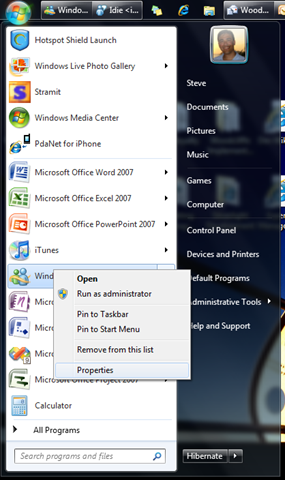
So find your Messenger in your “Start Menu” and right click on it and select “Properties”

image

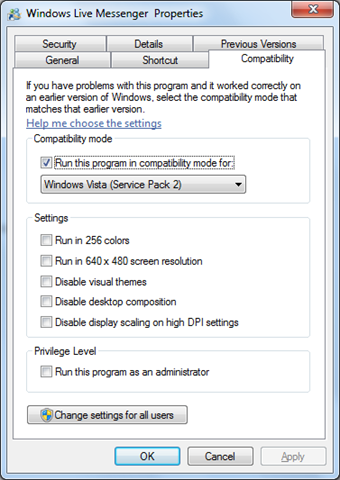
Then from the Compatibility tab, set the mode to “Windows Vista”

image 

Make sure to Restart Messenger and you done.

Now when you close your messenger window, it will run the way it did in the background accessible from your notification area.

image 

The last thing you might want to do is tell Windows 7 to always show the icon so you have it always ready to go…

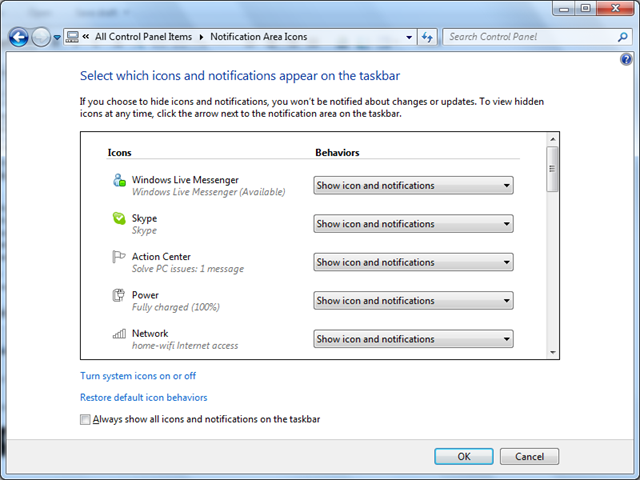
From the Control Panel, click Notification Area Icons and set the Windows Live Messenger to “Show icon and notifications”.

image

Cheers

S.

Wednesday, June 10, 2009

Excel Web Services format issue “Accounting” format vs “Currency”

Strange, but when you publish an Excel sheet to Sharepoint and view it with Excel Web Services, cells formatted as “Accounting” show as follows:

clip_image002

but when you change the format in Excel to “Currency”, it shows correctly:

clip_image004

Could it be some kind of spacing issue with the rendering of the “$” within the web page?

Tuesday, June 9, 2009

Fix - Excel Web Services returning "External References" Error

Today, we got a strange error when trying to open a published Excel 2007 Workbook in on Sharepoint with Excel Web Services.  The Excel web part returned an error saying "External References (links to other workbooks)" we in the file and could not be opened.  The 12 Hive log files had the same error and did not help any further with what the issue could be.

Looking at the file's external links properties in excel showed nothing.

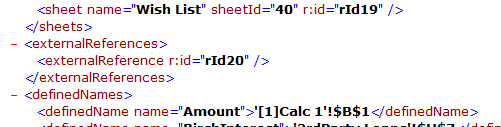
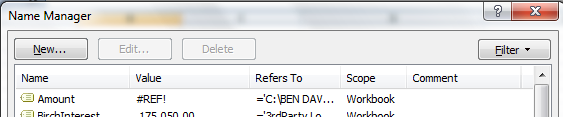
I ended up renaming the xlsx file to a zip, and unzipping the Excel file… scanned the workbook.xml file and found a reference to an “external reference” that did not show up in the Excel interface:

image 

Searching for the unique id in the rest of the zip file, i found it lead to a “Named Range’ that pointed to an external file.

Voila, went back into Excel, removed the Named Range….

image

Republished the Excel file and it worked.

MS should update the sharepoint error message saying a formula, or named range is referencing an external file.  Would have helped.

Cheers

S.

Friday, May 1, 2009

Woo Hoo…Windows 7 Media Center Extender to Xbox 360 plays all types of video types!!!

Finally…Without having to install any extra codec products (like KLite or Shark007 Codec Pack) Windows 7 play all of my home video files taken with the variety of cameras and camcorders we have used over the last 10 years.  What a joy to finally watch all our home movies right on Windows 7 as well as our XBOX 360 without any “conversion” like we had to back in the Vista/XP days. 

I love Windows Media Center.  Great job team.  Gets better every release.

ps… the “play favorites” has become a family favorite feature.

Windows 7 RC and Dell XPS 1330 – smooth sailing

I'm happy to report that the install of Windows 7 RC went very well on my Dell XPS 1330.  I'll write more about iimaget later, but I did not have to install anything specific from the dell website.  I just did a clean Windows 7 RC install, ran windows updates after the install which added fingerprinting, video display, and memory card (SD, etc) support. Other components installed during the initial install (Bluetooth and the embedded Dell Webcam).

Its so much faster than the Beta.

Only issue, Norton 360 3.0 seems to have issues where there were no issues with the Beta.

More later…

ps

MS has gotten really creative with their wall papers and account pictures