Showing posts with label Sharepoint. Show all posts

Wednesday, October 12, 2011

PowerPoint Storyboard template with Visual Studio 2011

A nice little surprise for me this morning when I started to browse what got installed with the Developer Preview of Visual Studio 2011.  Can you see it in the start menu?


Yes, it's a Storyboarding tool!  A PowerPoint 2010 add-in that gives you the ability to mock up Windows Apps, Web Apps, SharePoint Apps, and Windows Phone Apps!


Nice to see that the developer tools continue to expand reach to the supporting teams around core dev.

Anyone here on how Microsoft will be packaging this?  It should be a free download from the MS site, and not part of Visual Studio.

Thoughts?

Tuesday, April 12, 2011

Infopath 2010 bug after 2007 upgrade

Came across an interesting sharepoint infopath 2010 bug with a customer we upgraded from Sharepoint 2007 to 2010. After the upgrade, we opted to leave the UI to the 2007 look and feel until the customer was ready to train on the new 2010 ribbon. We came across a strange side affect with infopath 2010.

When a user opens a form and edits it in the browser, check boxes do not save. All other fields save. If you edit it in the infopath form in the client form filler, it saves checkbox values as expected.

We the tried to turn on the new visual experience on the site hosting the form library and tried editing the form in the browser and voila, it saved the changed check box values.

We then reverted back to the 2007 UI experience and the problem resurfaced.

Obviously the UI compat for 2007 interferes with the infopath browser client.

Anyone scan the Sharepoint CU's for a patch to this problem?

Tuesday, November 17, 2009

Installing SharePoint 2010 on Windows 7 or Vista 64-bit

Great step by step guide on how to install SharePoint 2010 Beta 2 on Windows 7/Vista in the SharePoint 2010 SDK:

http://msdn.microsoft.com/en-ca/library/ee554869(office.14).aspx#


SharePoint 2010 Beta 2 Standalone begin installed on my Sony CTO Z Vaio…

image

Tuesday, September 1, 2009

Microsoft Office 2010

A microsoftie, Kristin Bockius, posted some screenshots and commentary (that I cannot do under NDA) about the new Office 2010 system.

Some really great examples of some of the cool changes coming for the Office 2010 client.

http://blogs.msdn.com/bright_side_of_government/default.aspx 

Some things to note in her screenshots is that there is no more “Office Orb” button on the top left and has been replaced by a “Office Tab” that opens a fantastic set of features standard and custom features to each product.

(Images below linked to her website…if they are broken, then they were pulled off her site).

image_40[1]

image_38[1]

image_46[1]

Can’t wait to share more with the community on our findings.

S.

Tuesday, July 14, 2009

Excel Web Services and that Currency, Accounting format (bold) issue

I have been working with the Microsoft QA team on the Excel Services issue i blogged about earlier.  It turns out to fix the problem, install any custom fonts used by our excel spreadsheet that will be consumed through Excel Web Services on the server.  After you install the fonts on the server, an IIS Reset is required for it to take.

After doing so, Bold type fonts will render correctly.

Thanks MS QA for your help on this!

S.

Wednesday, June 10, 2009

Excel Web Services format issue “Accounting” format vs “Currency”

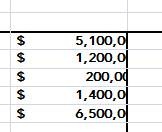
Strange, but when you publish an Excel sheet to Sharepoint and view it with Excel Web Services, cells formatted as “Accounting” show as follows:

clip_image002

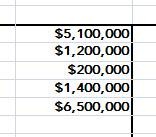
but when you change the format in Excel to “Currency”, it shows correctly:

clip_image004

Could it be some kind of spacing issue with the rendering of the “$” within the web page?

Tuesday, June 9, 2009

Fix - Excel Web Services returning "External References" Error

Today, we got a strange error when trying to open a published Excel 2007 Workbook in on Sharepoint with Excel Web Services.  The Excel web part returned an error saying "External References (links to other workbooks)" we in the file and could not be opened.  The 12 Hive log files had the same error and did not help any further with what the issue could be.

Looking at the file's external links properties in excel showed nothing.

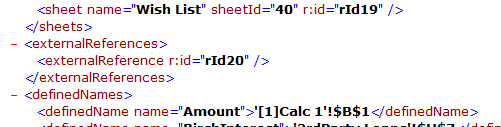
I ended up renaming the xlsx file to a zip, and unzipping the Excel file… scanned the workbook.xml file and found a reference to an “external reference” that did not show up in the Excel interface:

image 

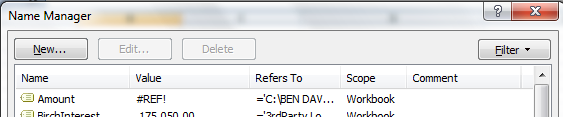
Searching for the unique id in the rest of the zip file, i found it lead to a “Named Range’ that pointed to an external file.

Voila, went back into Excel, removed the Named Range….

image

Republished the Excel file and it worked.

MS should update the sharepoint error message saying a formula, or named range is referencing an external file.  Would have helped.

Cheers

S.